TF (Transform) and Frame Concepts
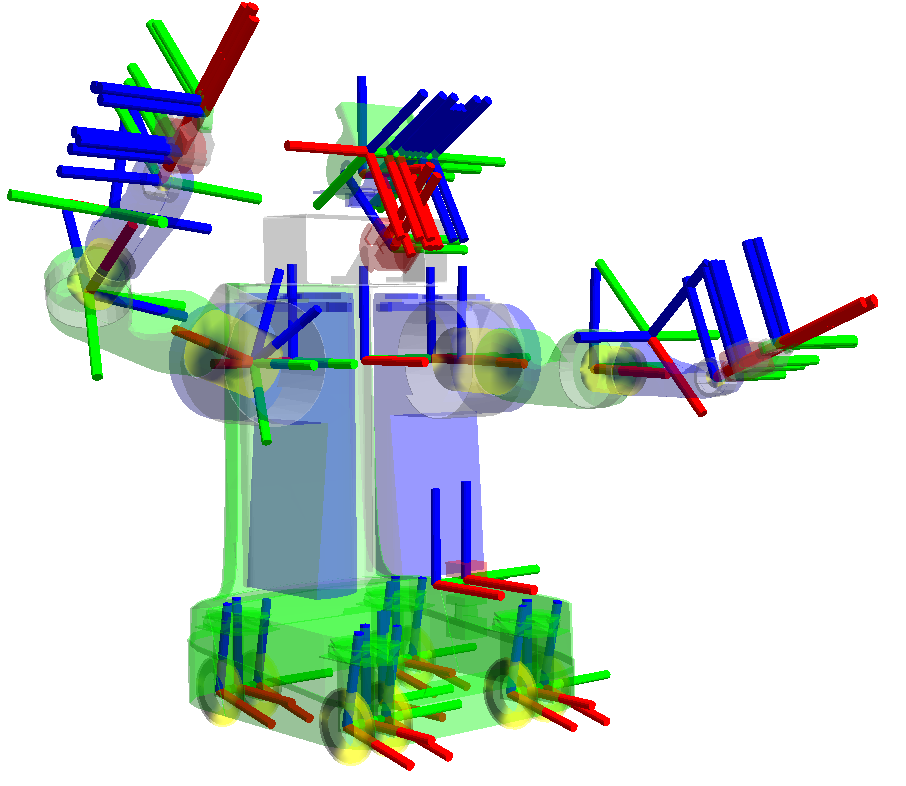
What is a Frame?
-
Before discussing TF, the concept of a frame must come first. A Frame answers the question “where is this robot’s state expressed?” It is a coordinate frame defined on the robot at the design and implementation stage. It expresses the robot’s state and position in relative coordinates; the frames are Euclidean, and each frame is defined independently.
-
As an example of a frame: if asked “where is the fingernail of your right index finger?”, it can be said to belong to the right index finger. So the fingernail belongs to the frame “right index finger”, and its position is roughly the fingertip. This raises a problem: from what reference does the position of the right index finger start, so that it describes the position of the right hand, then the position of the index finger relative to the hand, and then the position of the fingernail?
-
Each frame is therefore separate, and the relationships between frames need to be established. Using an absolute frame, position could most basically be described by latitude and longitude, but in practice the distance scale of a robot or its frames is too fine to describe in latitude and longitude, so relative frames are needed. The concept of TF is therefore the key point that solves this problem.
So what is TF?
-
In TF, the starting frame, i.e. the reference frame, can basically be set as World - Base_Link from a human perspective, or Map - Base_Link from a robot perspective. Strictly, a robot uses World - Map - Odom - Base_Link, but in most cases the robot’s motion and path were confined to the Map. For outdoor robots and exploration robots, the reference frame may start from World.
-
To briefly explain the TF (transform) formed between map and base_link with an example: if the robot is (2, -3, 1) away from the origin of map, then base_link is (0, 0, 0) but its coordinates in map are (2, -3, 1). Suppose the robot has wheels on both sides, each located 2 away from base_link; then the left wheel is at (0,-2,0) and the right wheel at (0, 2, 0) relative to base_link.
-
As in the example, the structure is map - base_link - left_wheel_link / right_wheel_link. What happens when the robot moves? If it moves 1 in the x direction, the coordinates of base_link become (1, 0, 0), and the robot’s coordinates in map change to (3, -3, 1). (To be more precise there should be an odom_frame, but it is omitted here.) However, the positions of the left and right wheels are still (0, -2, 0) and (0, 2, 0), because the coordinates of left_wheel_link and right_wheel_link relative to base_link do not change. Since every frame is independent, some frames do not change as the robot moves (static) and others change dynamically. These are called TF_static and TF_broadcaster. There is of course also the listener concept, but with a general understanding of TF the listener concept follows naturally.
-
The image below shows the TF_tree concept; it is organized in a tree form as shown. It illustrates the parent and child concepts of frames: for example, odom_Frame has map as its parent_frame and odom_frame as its child_frame. Also, the text generated along each arrow shows Average rate, Buffer length, etc. If the values change in real time the transform is designed as a TF_broadcaster, and if they do not change it is designed as TF_static.
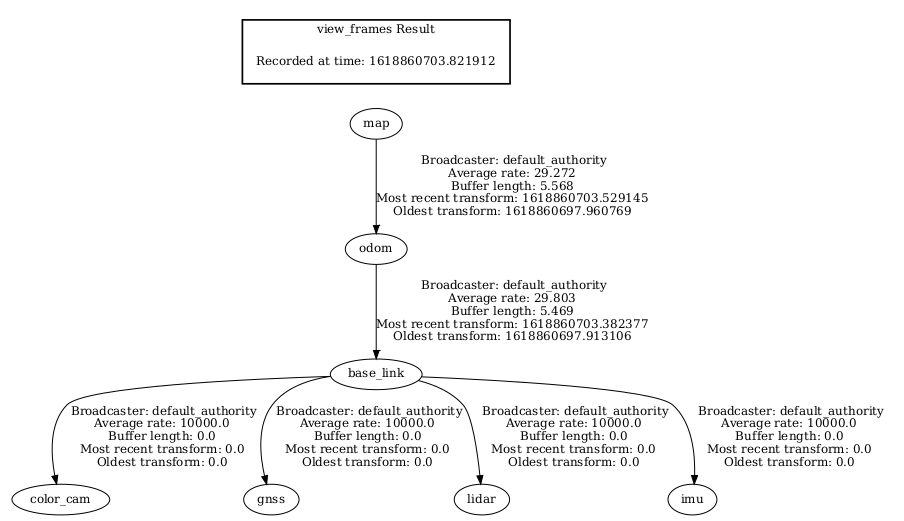
The parameters used in TF are as follows.
- translation : (x,y,z) translation between frames
- rotation : (x,y,z,w) rotation between frames
- time : the time at which the transform applies
- parent_frame : name of the parent frame (like, map)
- child_frame : name of the child frame (like, base_link)
Looking up the form of tf2_msgs/msg used in ros, it matches the parameters used above.
Looking at TF static and TF broadcaster through code
- Examples written in C++ and Python can be found through the reference pages below.
TF_static(C++)
#include <memory>

#include "geometry_msgs/msg/transform_stamped.hpp"
#include "rclcpp/rclcpp.hpp"
#include "tf2/LinearMath/Quaternion.h"
#include "tf2_ros/static_transform_broadcaster.h"

class StaticFramePublisher : public rclcpp::Node
{
public:
  explicit StaticFramePublisher(char * transformation[])
  : Node("static_turtle_tf2_broadcaster")
  {
    tf_static_broadcaster_ = std::make_shared<tf2_ros::StaticTransformBroadcaster>(this);

    // Publish static transforms once at startup
    this->make_transforms(transformation);
  }

private:
  void make_transforms(char * transformation[])
  {
    geometry_msgs::msg::TransformStamped t;

    t.header.stamp = this->get_clock()->now();
    t.header.frame_id = "world";
    t.child_frame_id = transformation[1];

    t.transform.translation.x = atof(transformation[2]);
    t.transform.translation.y = atof(transformation[3]);
    t.transform.translation.z = atof(transformation[4]);
    tf2::Quaternion q;
    q.setRPY(
      atof(transformation[5]),
      atof(transformation[6]),
      atof(transformation[7]));
    t.transform.rotation.x = q.x();
    t.transform.rotation.y = q.y();
    t.transform.rotation.z = q.z();
    t.transform.rotation.w = q.w();

    tf_static_broadcaster_->sendTransform(t);
  }

  std::shared_ptr<tf2_ros::StaticTransformBroadcaster> tf_static_broadcaster_;
};

int main(int argc, char * argv[])
{
  auto logger = rclcpp::get_logger("logger");

  // Obtain parameters from command line arguments
  if (argc != 8) {
    RCLCPP_INFO(
      logger, "Invalid number of parameters\nusage: "
      "$ ros2 run learning_tf2_cpp static_turtle_tf2_broadcaster "
      "child_frame_name x y z roll pitch yaw");
    return 1;
  }

  // As the parent frame of the transform is `world`, it is
  // necessary to check that the frame name passed is different
  if (strcmp(argv[1], "world") == 0) {
    RCLCPP_INFO(logger, "Your static turtle name cannot be 'world'");
    return 1;
  }

  // Pass parameters and initialize node
  rclcpp::init(argc, argv);
  rclcpp::spin(std::make_shared<StaticFramePublisher>(argv));
  rclcpp::shutdown();
  return 0;
}
-
Briefly, the code sets time / header / translation / rotation as inputs, and the rotation is defined as a quaternion.
-
Next, the TF_broadcaster code.
TF_broadcaster(C++)
#include <functional>
#include <memory>
#include <sstream>
#include <string>

#include "geometry_msgs/msg/transform_stamped.hpp"
#include "rclcpp/rclcpp.hpp"
#include "tf2/LinearMath/Quaternion.h"
#include "tf2_ros/transform_broadcaster.h"
#include "turtlesim/msg/pose.hpp"

class FramePublisher : public rclcpp::Node
{
public:
  FramePublisher()
  : Node("turtle_tf2_frame_publisher")
  {
    // Declare and acquire `turtlename` parameter
    turtlename_ = this->declare_parameter<std::string>("turtlename", "turtle");

    // Initialize the transform broadcaster
    tf_broadcaster_ =
      std::make_unique<tf2_ros::TransformBroadcaster>(*this);

    // Subscribe to a turtle{1}{2}/pose topic and call handle_turtle_pose
    // callback function on each message
    std::ostringstream stream;
    stream << "/" << turtlename_.c_str() << "/pose";
    std::string topic_name = stream.str();

    subscription_ = this->create_subscription<turtlesim::msg::Pose>(
      topic_name, 10,
      std::bind(&FramePublisher::handle_turtle_pose, this, std::placeholders::_1));
  }

private:
  void handle_turtle_pose(const std::shared_ptr<turtlesim::msg::Pose> msg)
  {
    geometry_msgs::msg::TransformStamped t;

    // Read message content and assign it to
    // corresponding tf variables
    t.header.stamp = this->get_clock()->now();
    t.header.frame_id = "world";
    t.child_frame_id = turtlename_.c_str();

    // Turtle only exists in 2D, thus we get x and y translation
    // coordinates from the message and set the z coordinate to 0
    t.transform.translation.x = msg->x;
    t.transform.translation.y = msg->y;
    t.transform.translation.z = 0.0;

    // For the same reason, turtle can only rotate around one axis
    // and this why we set rotation in x and y to 0 and obtain
    // rotation in z axis from the message
    tf2::Quaternion q;
    q.setRPY(0, 0, msg->theta);
    t.transform.rotation.x = q.x();
    t.transform.rotation.y = q.y();
    t.transform.rotation.z = q.z();
    t.transform.rotation.w = q.w();

    // Send the transformation
    tf_broadcaster_->sendTransform(t);
  }

  rclcpp::Subscription<turtlesim::msg::Pose>::SharedPtr subscription_;
  std::unique_ptr<tf2_ros::TransformBroadcaster> tf_broadcaster_;
  std::string turtlename_;
};

int main(int argc, char * argv[])
{
  rclcpp::init(argc, argv);
  rclcpp::spin(std::make_shared<FramePublisher>());
  rclcpp::shutdown();
  return 0;
}
Conclusion
Based on an overall understanding of the frame concept, one should understand TF and be able to apply it to a real robot. This post therefore briefly covered how to inspect the TF_tree and what the code means.
In short:
-
The difference between Static and Broadcaster: defining a tf as Static defines relative coordinates from a fixed frame, so it can describe static relationships but not dynamic motion that changes in real time. Defining a tf with the Broadcaster method defines relative coordinates for a frame that moves in real time, which is useful for defining relative coordinates (Map) on a moving robot. This is why, when computing Odometry, the robot’s position relative to map changes in real time and Odometry is defined using the Broadcaster method.
-
Of course, not every frame on the robot should be broadcast. The robot’s wheel_link relative to Base_link is a static coordinate that never changes, so such parts can be defined as Static tf. Rather than defining all relative coordinates as static or all as dynamic, dynamic ones are defined with Broadcaster and static ones with Static as the situation requires.
References
Writing a broadcaster (C++) — ROS 2 Documentation: Humble documentation