Gazebo Simulator Architecture and ROS Integration
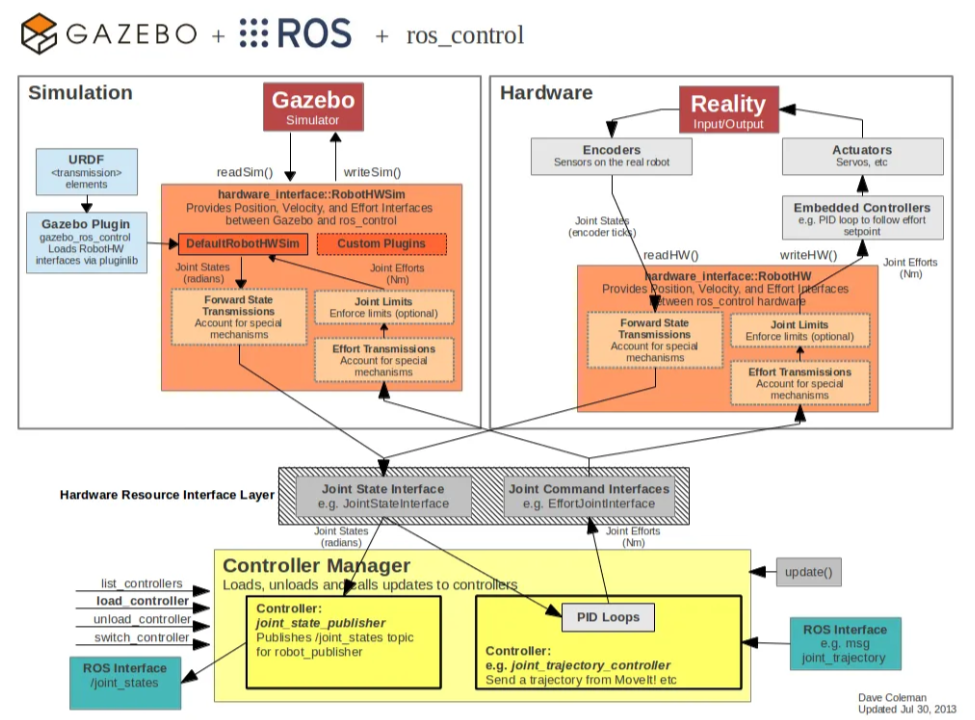
Gazebo_BlockDiagram
Source : https://classic.gazebosim.org/tutorials
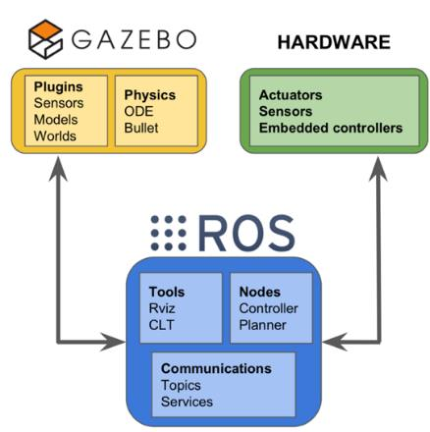
A simplified version of the diagram above is shown below.
What is Gazebo?

- Gazebo is an open-source 3D robotics simulator.
- It is used to simulate and visualize robot motion.
- Gazebo is integrated with ROS, so it is used in the majority of ROS-based projects and has evolved into a simulator software framework in its own right.
- Its strengths include support for many types of robots, sensors, and environments; users can build their own robots and configure their own environments. Robots can also be controlled and sensed during simulation, which yields a large amount of data.
- It provides realistic environment rendering, including lighting, sunlight, shadows, textures, and underwater environments.
- Ignition appeared in 2017 alongside Gazebo Classic. (I have not used it much, but the framework seems to be somewhat lighter.)
- Gazebo Classic integrates the ODE physics engine, OpenGL rendering, and support code for sensor simulation and actuator control, enabling the use of a high-performance physics engine.
)](/assets/img/blog/robotics/gazebo/image4.png)
Reference image : aws_warehouse (https://github.com/aws-robotics/aws-robomaker-small-warehouse-world)
What makes up a Gazebo environment
A Gazebo environment consists broadly of the environment (World) and the Models (sdf, urdf, xacro) that exist inside it, such as robots and sensors.
](/assets/img/blog/robotics/gazebo/image5.ppm)
World
A world file is written in XML and describes the simulation environment, including the position and shape of robots and other objects, sensors, light sources, and physical properties.
- Model : Used to describe the robots, sensors, etc. in the environment. Each model is defined by its position, rotation, links, and joints.
- Physics Properties : Physical properties of the simulation, such as gravity, friction, and collisions.
- Lights : Various types of lighting for a visually realistic environment; position, type, intensity, etc. can be configured.
- Ground : Describes the floor of the simulation. Terrain, texture, color, etc. can be defined.
-
Fluids : Can be configured if an underwater environment is needed in the simulation.
-
Example of a .world file (example.world; the relevant parts are briefly explained in comments)
  <?xml version="1.0"?>
  <sdf version="1.6">
    <world name="example">

  <!-- set up the ground -->
      <include>
        <uri>model://ground_plane</uri>
      </include>

  <!-- use the sun as the light source -->
      <include>
        <uri>model://sun</uri>
      </include>

  <!-- whether to render shadows -->
      <scene>
        <shadows>false</shadows>
      </scene>

  <!-- full-screen setting and the initial camera viewpoint at launch -->
      <gui fullscreen='0'>
        <camera name='user_camera'>
          <pose frame=''>0.319654 -0.235002 9.29441 0 1.5138 0.009599</pose>
          <view_controller>orbit</view_controller>
          <projection_type>perspective</projection_type>
        </camera>
      </gui>

  <!-- ODE physics engine settings -->
      <physics type="ode">
        <real_time_update_rate>1000.0</real_time_update_rate>
        <max_step_size>0.001</max_step_size>
        <real_time_factor>1</real_time_factor>
        <ode>
          <solver>
            <type>quick</type>
            <iters>150</iters>
            <precon_iters>0</precon_iters>
            <sor>1.400000</sor>
            <use_dynamic_moi_rescaling>1</use_dynamic_moi_rescaling>
          </solver>
          <constraints>
            <cfm>0.00001</cfm>
            <erp>0.2</erp>
            <contact_max_correcting_vel>2000.000000</contact_max_correcting_vel>
            <contact_surface_layer>0.01000</contact_surface_layer>
          </constraints>
        </ode>
      </physics>

  <!-- additional structures or robots can be declared here (optional) -->
  <!-- visual (rendering) and collision settings of the link -->

      <link name="wall">
        <visual name="wall">
          <geometry>
            <mesh>
              <uri>model://{world_repository}/meshes/wall.obj</uri>
            </mesh>
          </geometry>
          <transparency>0.0</transparency>
          <material>
            <diffuse>1.0 1.0 1.0</diffuse>
            <specular>0.1 0.1 0.1</specular>
            <pbr>
              <metal>
                <metalness>0.0</metalness>
                <albedo_map>model://{world_repository}/meshes/white_brick.png</albedo_map>
              </metal>
            </pbr>
            <script>
              <uri>model://{world_repository}/meshes/</uri>
              <name>wall_Diffuse</name>
            </script>
          </material>
        </visual>

        <collision name="collision">
          <geometry>
            <mesh>
              <uri>model://{world_repository}/meshes/wall.obj</uri>
            </mesh>
          </geometry>
          <surface>
            <contact>
              <collide_bitmask>0x01</collide_bitmask>
            </contact>
          </surface>
        </collision>
        <pose>-9.817441860465117 -12.710465116279071 0 0 0 0</pose>
      </link>


    </world>
  </sdf>
Model
The file formats for defining robots and sensors are SDF (Simulation Description Format), URDF (Unified Robot Description Format), and Xacro. Their characteristics and differences are as follows.
- SDF :
- A file format for the Gazebo simulator that defines simulation elements such as robots, sensors, and environments.
- Written in XML; defines the physical properties of models, sensor attributes, environment textures, etc.
- URDF :
- URDF describes the geometric and visual properties of a robot.
- Written in XML; describes the robot’s structure by defining its links and joints, i.e. its geometric shape.
- Used by robot modeling and visualization tools; primarily a file format for ROS.
- Xacro :
- An extension of URDF that makes XML-based URDF files more efficient to write. Likewise a file format for ROS.
- Provides parameterization and macros, making code easier to reuse and more readable.
- More concise and easier to maintain than plain URDF files.
In summary: SDF is for Gazebo simulation; URDF defines the geometric structure of a robot and is therefore compatible with ROS for robot modeling and visualization; Xacro is an extension of URDF that makes URDF easier to write.
The next post covers the structure of model files and Gazebo plugins.
Reference : Gazebo : Tutorials