Building a Custom Gazebo Battery Plugin
-
The basic concepts of Gazebo plugins were covered in the previous post. Reference : /blog/2021/gazebo-plugin/
-
This post goes a little deeper into Gazebo plugins by walking through a simple example of customizing a battery system as a Gazebo plugin.
Battery system
- A battery system can be implemented in many ways, but here it is implemented considering only standby power and active power consumption. (In reality a BMS (Battery Management System) would model power consumption non-linearly.)
- Taking standby power into account, the battery drains roughly linearly even when the robot is not moving; when the robot moves, the power consumption of the motor drivers is also included so that the battery drains at a higher rate.
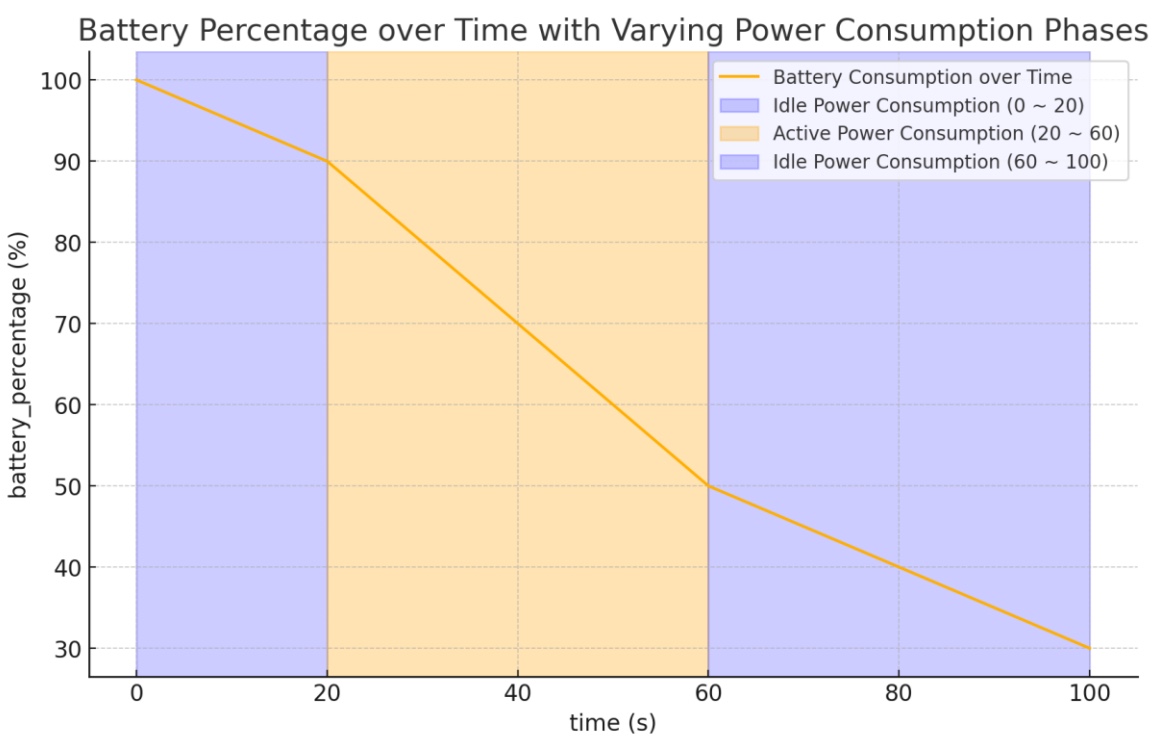
Gazebo Plugin (Custom)
- To customize a Gazebo plugin, proceed as follows.
-
Create a source file in the workspace and include the Gazebo header files.
#include <gazebo/common/Plugin.hh> #include <rclcpp/rclcpp.hpp> #include <std_msgs/msg/float32.hpp> #include <std_msgs/msg/string.hpp> #include <gazebo_ros/node.hpp> #include <gazebo/physics/Model.hh> #include <gazebo/physics/World.hh> #include <gazebo/physics/Link.hh> #include <gazebo/physics/Joint.hh> #include <geometry_msgs/msg/twist.hpp> #include <gazebo/common/common.hh> #include <gazebo/common/Exception.hh> #include <gazebo/transport/transport.hh> // add any other header files you need -
Set it up as follows so that parameters can be configured from the SDF file.
// Read parameters from SDF if (_sdf->HasElement("topic_name")) topic_name_ = _sdf->Get<std::string>("topic_name"); else topic_name_ = "battery_status"; // default value -
Set up the publisher for the battery information topic.
battery_pub_ = node_->create_publisher<sensor_msgs::msg::BatteryState>(topic_name_, 10); -
Create and implement a callback function that updates the battery state.
battery_charge_ -= scale_ * power_consumption * dt / 3600.0; // Convert power (W) to energy (Ah) voltage_ = (battery_charge_ / capacity_) * constant_voltage_; double battery_percentage = (battery_charge_ / capacity_) * 100.0; -
In CMakeLists.txt, add the class to a library and complete the remaining settings.
cmake_minimum_required(VERSION 3.5) project(gazebo_battery_plugin) find_package(gazebo_ros REQUIRED) # ... other find_package entries # ... ex, find_package(rclcpp REQUIRED) # include directories( include ${GAZEBO_INCLUDE_DIRS} ${rclcpp_INCLUDE_DIRS} # ... other include settings # Build the plugin add_library(BatteryPlugin SHARED src/BatteryPlugin.cc) ament_target_dependencies(BatteryPlugin rclcpp std_msgs gazebo_ros geometry_msgs gazebo_dev sensor_msgs) target_link_libraries(BatteryPlugin ${GAZEBO_LIBRARIES}) # install install(TARGETS BatteryPlugin LIBRARY DESTINATION lib ) #ament_package() -
Create a build folder and run cmake to generate the plugin library in the build folder.
cd buildcmake ..make -
Point Gazebo at the build folder so that the generated library can be loaded as a plugin.
export GAZEBO_PLUGIN_PATH=$HOME/gazebo_battery_plugin/build:$GAZEBO_PLUGIN_PATH -
To use the plugin, configure it in the SDF file just as the other sensor plugins were added earlier.
<!-- *********************** Battery STATE *************************** --> <plugin name="BatteryPlugin" filename="libBatteryPlugin.so"> <topic_name>battery_state</topic_name> <battery_charge>2.5</battery_charge> <scale>100.0</scale> <capacity>2.5</capacity> <voltage>39.6</voltage> <constant_voltage>39.6</constant_voltage> <lin_discharge_coeff>-1.0</lin_discharge_coeff> <design_capacity>3.3</design_capacity> </plugin> -
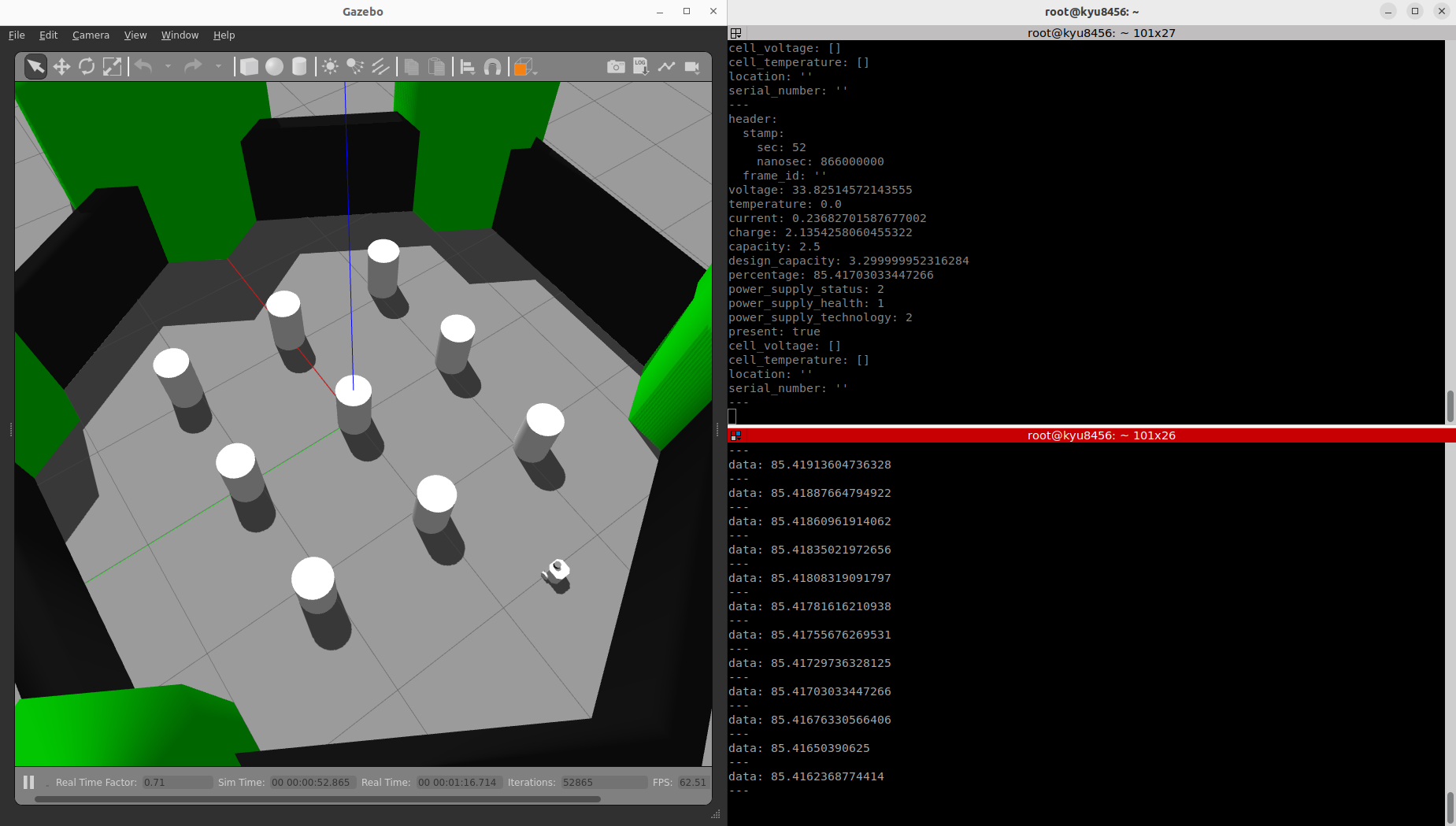
Checking the topic data
- topic : battery_state / battery_percentage
- battery_state outputs the sensor_msg data such as voltage and current; battery_percentage outputs the remaining battery level from battery_state.
Reference link : https://classic.gazebosim.org/tutorials?cat=guided_i&tut=guided_i5