Docker Basics: Images, Containers, and Key Commands

-
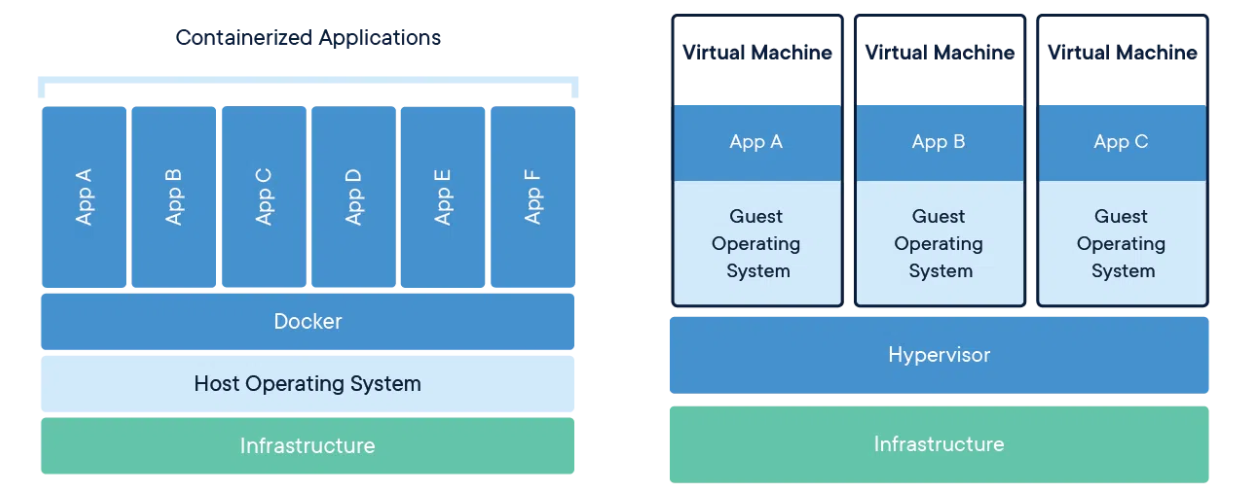
Docker is a container-based virtualization platform that runs and manages Linux applications as containers using process isolation technologies, allowing software to be packaged and distributed in units isolated from the environment.
-
The advantage of Docker containers is that everything needed to run the software is wrapped in a complete file system, so the software always runs identically regardless of the environment it is executed in.
- Docker image
- A file system containing everything needed to run an application.
- Images are defined with a Dockerfile and built with the Docker CLI.
- Docker container
- An instance of a Docker image, with its own file system and application runtime environment.
- Containers are isolated but can share the host system’s resources.
- Docker registry
- A repository used to store and share Docker images.
- Docker Hub is the most widely used platform.
- Docker Compose
- A tool for defining and running Docker applications.
- Multiple containers are defined in a YAML file and the application can be started with a single command.
- Docker Swarm
- A Docker clustering and orchestration tool that manages and deploys Docker containers across multiple hosts.
- Swarm is used to scale services and ensure high availability.
docker command
Descriptions of frequently used docker commands
docker pull image_name
Pulls an image from Docker Hub or another Docker registry.
docker commit container image_name
Commits a running container as an image (turns the container into an image).
docker run --options
Used to create and run a container from a docker image. There are many options.
-d : run the container in the background
-v : share a directory between the host and the container
-e : set environment variables inside the container
–name : specify the name of the container to run
-it : run the container interactively
etc..
docker ps
Lists the containers running in the docker environment.
docker ps -a
Lists all containers in the docker environment.
docker image list
Shows the list of Docker images.
docker rm container_name
Deletes a Docker container.
docker rm image_name
Deletes a Docker image.
docker exec -it container_name /bin/bash
Opens an interactive bash shell inside a running Docker container.
docker attach container_name
Attaches to a running container and takes control of its terminal.
docker start container_name
docker stop container_name
Starts or stops a container.
Sharing the DISPLAY locally
xhost +local:
Conclusion
- Docker’s advantage is that development, test, and production environments can be kept consistent.
- Virtualized containers are lightweight and start quickly, so resources are used efficiently.
- Containers run identically anywhere, giving excellent portability.